My thoughts about editors in 2020 #
I have been trying a lot of editors lately. When I say “trying”, I really meant I spent some time configuring and using those editors. The ones I spent time using are:
- neovim, my main, daily editor I use for pretty much almost all projects I work on.
- IntelliJ IDEA, that I currently use at work to hack on Java codebases.
- VS Code, that I have been trying mainly in Rust, TOML and Markdown.
- emacs, that I highly hacked around to play on my Haskell and Rust codebases (and YAML / Markdown / TOML too).
- DOOM Emacs, that I tried when I saw a colleague in a previous company I worked in (I was impressed by the “united” feeling of the UI and by how everything looked so slick). So I gave it a try.
- atom, GitHub’s take on editors. Same thing, mostly Rust, Haskell, etc.
- A bunch of others that I won’t talk about because I quickly stopped using.
The goal of this article is to create a temporal “snapshot” of my views on editors and what I think about the current situation. I have been using vim and especially neovim for more than a decade. I need to explain about my current workflow and what I cherish in editing before talking about each editors. Expect a point of view from a neovimer which is looking around at lots of editors.
This is only a personal workflow / point of view that works well for me right now. It doesn’t mean it will for you and it doesn’t mean a different workflow would be worse.
- What I think powerful editing should be
- The editors
- Wrap it up
What I think powerful editing should be#
Keyboard layout#
I am French and I’m using a keyboard layout that is made to type very quickly in French and to code. With hindsight, since I type more often in English than in French, maybe I should have picked another keyboard layout, but the coding experience in my keyboard layout is really great, so I stick around.
The keyboard layout is bépo. I learned bépo the “recommended” way — i.e. you have to practice typing (« dactylographie » in French). It means that I use all my fingers to type on a keyboard, and that each key on the keyboard is assigned a single finger that will press it. That helps a lot with muscle memory and to reduce wrist pain (my wrists barely move when I type on a keyboard), among other things. The typing speed is a side-effect of being accurate and having good comfort (if you are curious, I’m pretty fast but there are faster people — I type at around 120 to 130 words per minute). Because I think the speed doesn’t matter when programming, I think the most important part to remember here is the comfort: the wrists don’t move and my fingers fly around the keyboard, whatever the speed.
Modal editors#
I think a modal editor is superior, for various reasons. The
first one is that I truly hate having to use a
mouse for something that can be done without having to
move around hundred of pixels with your cursor and clicking on
buttons. For instance, running an application, on my current
machines, is simply typing alt d, the name of the
program (I typically use completion, so I never type fully the
name of the program) and hit enter. All this without moving my
hands from the keyboard. And I do that for programs like
firefox, kdenlive, etc. but for terminal
applications, I simply type and complete them in my terminal,
which I open simply with alt return.
So, using a mouse to move around a cursor in an editor feels like completely suboptimal to me, especially because we write code (i.e. we type on a keyboard) most of the time, so moving around with the mouse implies several back and forth movements between the keyboard and the mouse. Maybe you don’t care and it’s cool to you, but to me, this is truly horror land. I feel very uncomfortable when doing this.
Also, modern editors that are not modal typically make people move by using the arrows keys, which are either far on your keyboard, or — like my keyboard, a 60% home made one — not in direct access and then require a function key to enable them.
So that’s the first reason why I like modal editors. They make
a smarter use of your keyboard for simple yet recurrent features,
like moving around — e.g. h j k l. The second reason
why I like them is because of the facts they have a completely new
mode for non-modal editor (i.e. the normal mode), you
have a whole keyboard / lots of keys to bind actions to and do
lots of things people usually do with the mouse. Being able to
split an editor into several buffers, move around the buffers, go
at the beginning of the paragraph, search and replace, register
actions into macros and replay them, etc. All this without even
moving the wrists. The learning curve is steep if you’re used to
the mouse, but once you’ve passed the mental barrier, really, and
this is a personal opinion, but I truly think that using the mouse
again after that feels like handicap to me.
How I like to move around#
When I look at people coding, I see several kind of programmers:
- The ones who move with the arrows or with
h j k lin modal editors. You can spot them very easily at how the cursor moves in a document. It typically implies keeping a key pressed until the cursor reach a given row, then pressing another key until the cursor reach a given column and then adjust if they went passed the location they had in mind. - People using the mouse, by clicking at the place they want to put the cursor at.
- People using relative numbers. That’s an enhancement
of the first group: they typically use relative numbers to know
which lines they want to jump to very quickly, so that they don’t
have to press the up / down keys for ages until reaching the line
they want to. Instead, they look at the number on the lines, press
that number, and the direction, and bam, they are on the lines.
They then use typical motions from vim like
$(go to end of line),f(go to the first occurrence of the next character typed afterf, likef(will make your cursor go to the next(),%(go to the matching delimiter) orw(go to the beginning of the next word) /b(go to the beginning of the previous word), etc. to move faster on the same line (it works across lines too).
I think that represents 99,9% of what I see people do.
Obviously, you will get that I don’t belong to the second set of
people… but I don’t really belong to any, actually. How I move is,
I guess, convoluted for most people and I know some people won’t
understand how it can feel. I use h j k l and all the
motions from vim described in the third group (and even more; I
full lecture of four hours would be required to explain all of
them :D), but it all depends on the distance I need to
travel. If my cursor is on a word and I want to move to the
beginning of a word located very closely to my cursor on the same
line, I’ll simply type www if it’s three words apart
(or 3w if I’m feeling funny). If the distance is
higher, I use a tool called [EasyMotion].
Easymotion really is a wonderful tool. The idea is that it has several modes, depending on the kind of move you want to perform:
- By lines: this mode allows you to jump to any line in the current (or all open) buffers.
- By words: tihs mode allows you to jump to any “word” in the current (or all open) buffers.
- By characters: when the word mode doesn’t help with jumping to a special operator or character (because it’s not recognized as a word), this mode allows you to jump to any character in the current or (or all open) buffers.
- It has other modes but I have never really found useful cases for them.
The way I typically do it is by mapping the three modes to
<leader>l, <leader>w> and
<leader>c (in my case,
<leader> is the space key).
Typing SPC l in my current buffer results in
this:
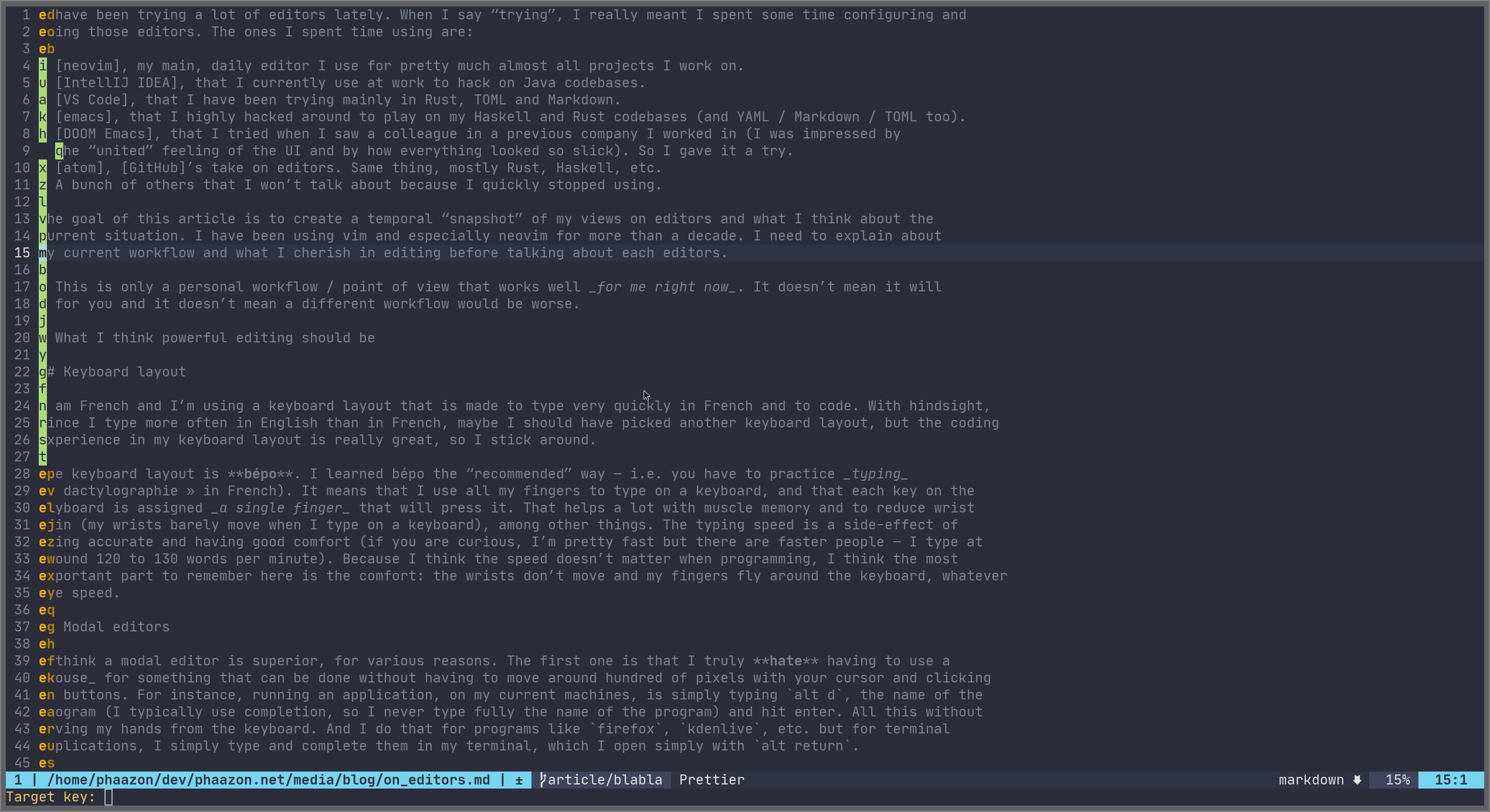
Typing any highlighted character will make my cursor jump to
it. The same applies for words, with SPC w:
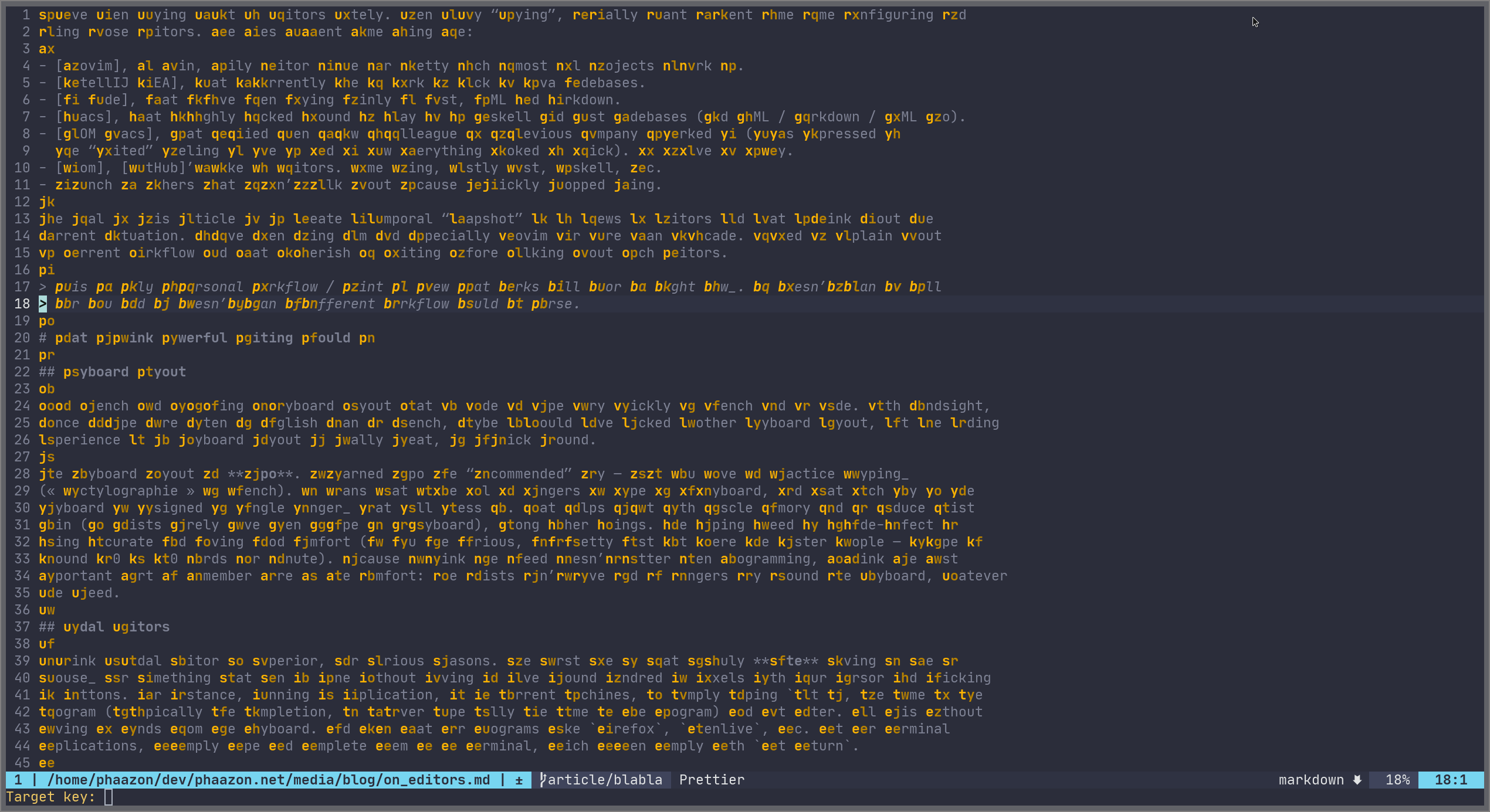
For the character mode, after pressing
SPC c, I have to press another character (the one I
want to jump to). Let’s say we want to jump to a #
(which is not part of words): SPC c #:
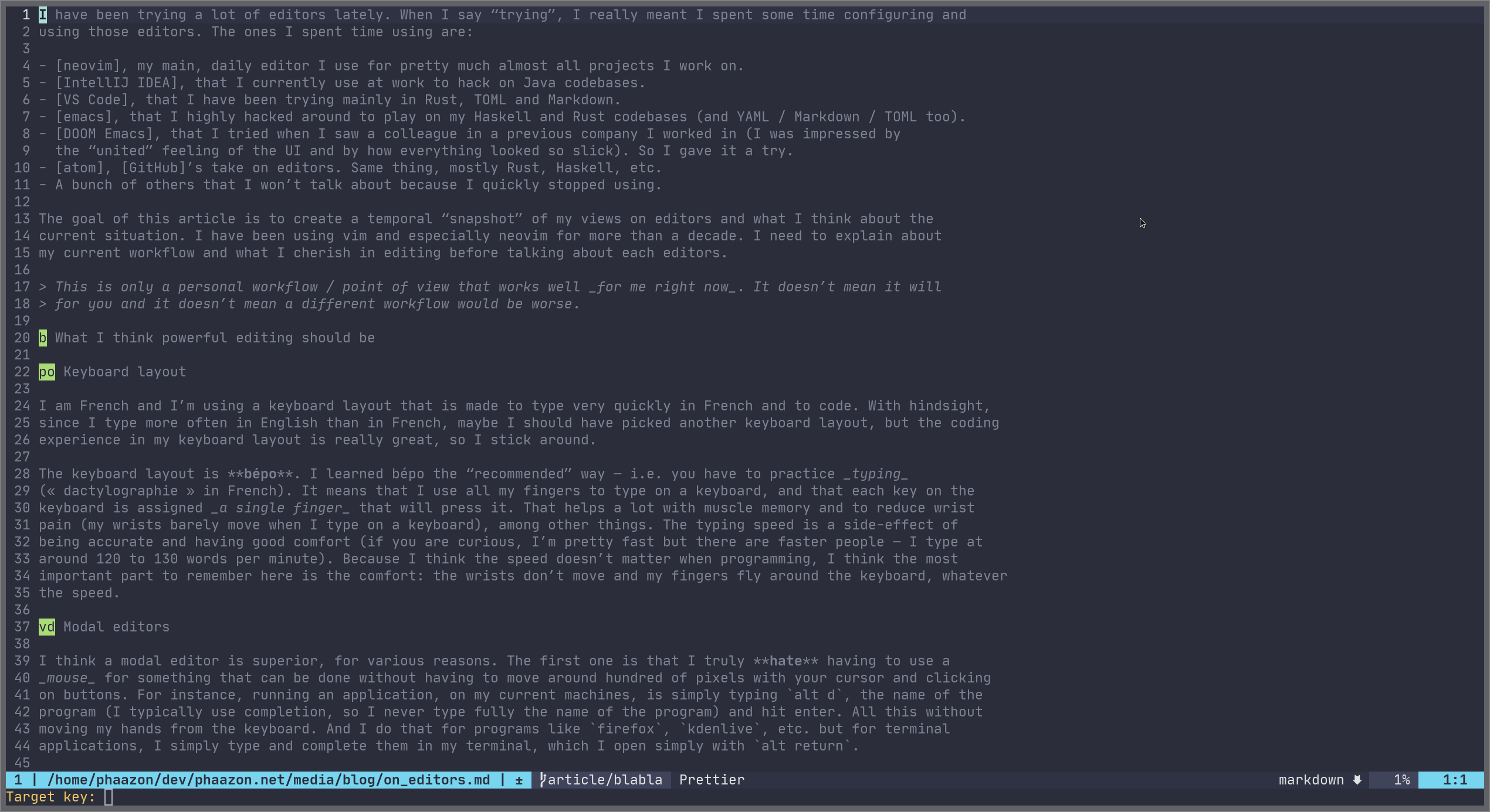
This way of moving is not intuitive at first, but once you get used to it… it’s a must have.
All the other modal candies#
Among all the things that I like about modal editing, here is a non-exhaustive list of features I expect to have around my fingers:
C-iandC-o: those allows me to jump to something / a file / a place in a buffer and then go back to where I was right before withC-o(read it like out) or go back again withC-i(read it like in).- Macros and registers: those allow me to yank content into
different registers (like clipboards) by assigning a single key to
paste their content. For instance, I can put a few lines in my
tregister with"tyi((“put in thetregister theyankinside matching(), and paste that content later with"tp. Macros allow more powerful editing control by assigning a key to set of actions with theqkeyword (qawill register all the next keystrokes and actions into theamacro). Then simply replay the macro with@a, for instance. - Obviously, all the basic vim motions, like
dto delete,yto yank,cto change,tto go to the character right before the one you search,%to go to the other delimiter, etc. And more complex text manipulation, such as “Let’s change what’s inside this function parameter list, delimited by(”:ci(.
It would take too much time to list everything, but the main idea is: I need the modal features when editing code.
The editors#
So let’s talk about the list of editors I mentioned in the preface. The idea is to give my own opinion on those editors. What I like about them regarding the way I like to edit code and what I think is missing.
neovim#
I currently use neovim in its TUI version, because it’s the most stable, fast and easy neovim experience out there so far to me. I have tried several GUI versions but never found what I was looking for — the main reason being that they pretty much all of them use Web™ technologies, and it’s a hard no to me. I think I should elaborate a bit more about that last point.
Why not using Web tech:
- Editing something on my machine has nothing to do with Web technology. This applies to lot of other things, but truly, running a complex JavaScript VM / CSS engine in an editor seems so wrong on so many levels (performance being the first one).
- Most of the time, editors based on Web tech take ages to load.
Yes, even VS Code — remember that my daily editor is neovim,
which loads in around 23ms with almost 50
packages installed (you can profile with
:profileto get that value). Among those 23ms, coc.nvim take around 12ms. - Scripting. Scripting in JavaScript or CoffeeScript is a hard no to me.
npmis one of the worst piece of software ever written. Please don’t make me use it again.
My neovim setup#
So I use several plugins that I’m going to describe. I think it’s important that people know about all those because, in the collective mind, people still think vim / neovim are editors from the past. Well, not really.
- ryanoasis/vim-devicons
- Add lots of unicode icons that other packages will use to provide a fancier and sexier interface experience.
- sainnhe/sonokai
- The current colorscheme I am using. It is very similar to what you get with DOOM Emacs — even though it’s a bit less contrasted.
- neovimhaskell/haskell-vim
- Haskell syntax support for neovim.
- rust-lang/rust.vim
- Rust syntax support for neovim.
- plasticboy/vim-markdown
- mzlogin/vim-markdown-toc
- A very cool package that gives a way to create table of content in Markdown buffers and let neovim automatically update the sections when you edit headers.
- tikhomirov/vim-glsl
- GLSL syntax support for neovim.
- cespare/vim-toml
- TOML syntax support for neovim.
- ElmCast/elm-vim
- Elm syntax support for neovim.
- idris-hackers/idris-vim
- Idris syntax support for neovim.
- posva/vim-vue
- Vue.js syntax support for neovim.
- baskerville/vim-sxhkdrc
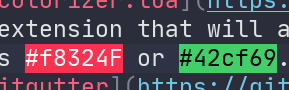
- norcalli/nvim-colorizer.lua
- A super cool extension that will automatically change the background color of texts containing an hexadecimal value, such as #f8324F or #42cf69:
- airblade/vim-gitgutter
- One of the best plugin I have installed. It provides the gutters you see on the top of your buffer when editing a file versioned in git (added, modified, deleted, etc.):
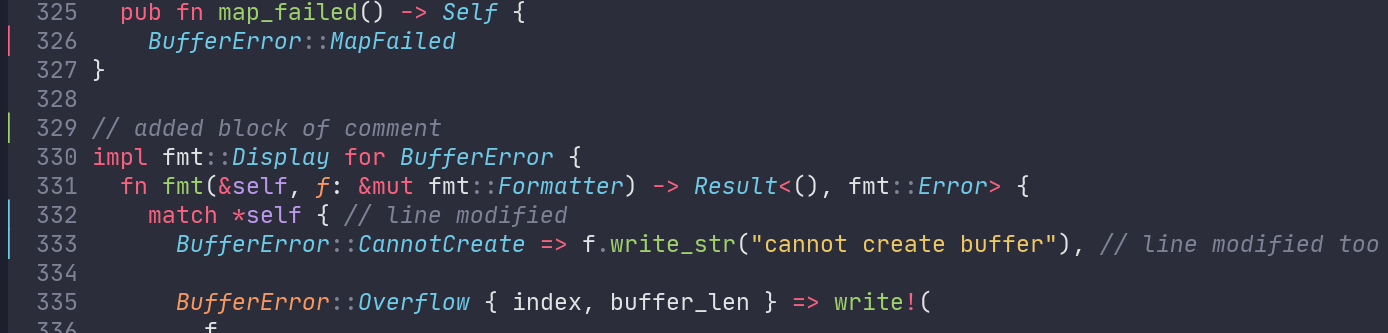
- But it can do more, and among all the things it can do, it can help you preview hunks, stage or discard them inside your editor. That’s just a blast to me:

- tpope/vim-fugitive
- All the features you expect to find from git inside neovim. You can see diff, resolve merge conflicts, write commit messages, etc. etc. However, I tend to still keep around the command line as I’m not completely solved on how this plugin deals with fixups and squashing in general.
- rhysd/git-messenger.vim
- A blame-at-cursor tool. Not really that useful actually, as fugitive already has a git blame window that will annotate each line with the commits. I sometimes use this one, but I might get rid of it.
- tveskag/nvim-blame-line
- A git blam inlined, at the right part of your lines. Very similar to the default git plugin from VS Code, for instance.
- junegunn/fzf.vim
- If there is one plugin you should install,
it’s this one. It has so many features: opening files,
git files, buffers, rip-grepping, searching through history,
commands, colorschemes, etc. etc. And as the name implies, it uses
fzfas a backend, so you get a very cool fuzzy search experience (with refined search, which I struggle to find in any other editor — i.e. you can type something, then put a space and type again to match things occurring before the actual match).
- If there is one plugin you should install,
it’s this one. It has so many features: opening files,
git files, buffers, rip-grepping, searching through history,
commands, colorschemes, etc. etc. And as the name implies, it uses
- machakann/vim-highlightedyank
- A funny one: it will highlight the lines / objects you yank for a better visual feedback. Surprising neovim doesn’t have that by default.
- liuchengxu/vista.vim
- I use this one from time to time to get a symbol tree, but the output is not really appealing to me right now. I might ditch it too.
- neoclide/coc.nvim
- The best completion engine for neovim, by far. I used to use others,
such as
ale, but this one is ace. It basically provides you with LSP completion for lots of languages. It has an integrated marketplace you can use to install new LSP servers and integrations, and it even has support for things completely unrelated (a bit surprising, I think these should be standalone plugins), such ascoc-explorer(which is a replacement ofNERDTreeto me now),coc-snippets, etc.
- The best completion engine for neovim, by far. I used to use others,
such as
- tpope/vim-commentary
- Easily comment / uncomment lines without having to insert the comment symbols yourself.
- liuchengxu/vim-which-key
which-keyfrom emacs, but for neovim. Basically, when setup properly, it will provide you with a visual list of possible keybindings for sequences. I think it’s not that useful (or it is for people trying to use your configuration or if you install a plugin that ships a lot of keybindings — which I truly dislike, btw), but it looks pretty cool.
- itchyny/lightline.vim
- A status line that looks pretty cool.
- SirVer/ultisnips
- Snippets support. The snippet engine of
ultisnipsallows for a lot of room, like interpolation via shell, viml, python, etc.
- Snippets support. The snippet engine of
- honza/vim-snippets
- A collection of snippets for commonly used languages and file formats.
- junegunn/vim-easy-align
- A pretty neat plugin to easily align texts / tables with a few keystrokes only.
- liuchengxu/vim-clap
- A take on uniting all possible source of search / fuzzy
finders in a modern and fast UI. Unfortunately, right now, the
plugin is pretty unstable to me, so I keep using
fzfinstead.
- A take on uniting all possible source of search / fuzzy
finders in a modern and fast UI. Unfortunately, right now, the
plugin is pretty unstable to me, so I keep using
- easymotion/vim-easymotion
- I think I have explained what that is about earlier. ;)
What I like about neovim#
- It’s fast. It really is. It opens immediately. Moving around, scrolling, etc. is smooth, whatever the terminal I’m using (even though I’m currently using alacritty).
- The plugins and effort put into neovim are really great. I love
vim-gitgutterso much; I love the colorizer plugin a lot too. coc.nvim has been a blast so far (for most part). EasyMotion is typingporn to me.fzfis so fast it should be illegal. - neovim has a community that is truly passionated about what they are doing, and new versions add lots of very cool features that we quickly adopt into new plugins, such as the popup / floating windows / virtual texts for linter annotations, etc. etc.
- It’s lightweight: your RAM will thank you.
- Something I haven’t talked about but is a killer-feature of
vim / neovim: the
:helppages. I think no other software has such a cool set of help pages. Really, give it a try. You want to know how to configure coc.nvim? Simply type:help coc-nvim. - Plugin managers exist (I personally use vim-plug but you will find more), and they make your life so much easier.
What I dislike about neovim#
- Even though I love how fast the TUI is (I truly haven’t come across anything faster so far), TUIs feel like hacks to me. For instance, if you split a window into two buffers, the vertical “marks”, “edges”, whatever-you’d-like-to-call-them, are actual unicode characters. The way terminals work make it possible to ignore those characters, but still, it feels hacky. If you want something like a minimap or a simply thin frame around some text, or any kind of visual feedback that is a bit more complicated than simply turning bold mode or underlying, you’re basically not going to get it.
- The GUIs for neovim are… not up to my expectations. Most of them are based on Web tech anyway, so they’re not good candidates to me. For the rest, like clients based on Qt, they feel a bit abandonned :(. There are people trying to make new ones, but they are not ready AFAIK.
- coc.nvim sometimes feel like is doing the wrong thing. For instance, when editing Java, it timeouts very often when trying to jump to the definition of a symbol (or simply looking a symbol up). That’s bad.
- Changing my colorscheme while the editor is running is a waste of time and generates broken syntax highlighting everywhere. A pity to me. :(
IntelliJ IDEA#
So I won’t going to be able to talk too much about this one, because I have only started using it at work (community edition). I’m using the vanilla one, with few modifications to none. I edit only Java with it.
What I like about IntelliJ IDEA#
The Java support is truly flawless. It does a lot of things for you, and among them, I was really impressed by:
- The refactor mechanism that would allow me to select a block of code inside a function, ask the editor to “move that into a dedicated function”. So far, all editors can do that, but what impressed me is that IntelliJ IDEA was able to find out which variables needed to be captured and put as arguments to the function, then automatically pass them at call site, when replacing the block of moved code. Really neat.
- The speed at which you can look for symbols, look for implemented functions, inherited classes, super classes, etc. It’s all instant and it’s all very well presented to you. Me gusta.
- The syntax highlighting is okay; I especially like the inlined
type ascriptions for both
vardeclarations but also when passing arguments to functions.
What I dislike about IntelliJ IDEA#
- I’m using the community edition, which only supports Java and a bunch of other configuration languages. You don’t get the profiler, for instance — which would be very well appreciated!
- Even though the asynchronous part of the editor is impressive, it sometimes index projects at random times and if you’re working on a laptop, brace yourself for Mars landing as the machine is lifting off! — i.e. it makes a hella noise and heats up quickly.
- I tried the Vim integration and I wasn’t able to use it correctly with my bépo keymap. Unable to remap some motion and/or mode switches. I disabled it and cried deeply.
- Without Vim support, even though the editor has a lot of shortcuts, it feels like you still have to use the mouse to perform very basic tasks.
VS Code#
So this one is an important one, as it’s Microsoft’s take on editing. Everybody seems to love VS Code, and I get why. The UI is slick and fast — for a Web-based editor… ;). LSP support is obviously premium and flawless. It has a lot of community plugins, themes and integrations. For most part, even though it’s Web based, I have been enjoying it.
What I like about VS Code#
- The slickness of the editor / UI.
- Language support is premium with LSP and editing with it feels very solid.
- Millions of plugins.
- Big community and most of people use it nowadays, so I guess that if you get any trouble, you can ask around?
What I dislike about VS Code#
- The fact it’s written with a Web tech. Among all editors Web-based, it’s the fastest, but still, if you’re used to vim / neovim, you’ll be dissatisfied with it.
- The vim integration is poor / doesn’t work (I tried remapping
htoc— remember, bépo keyboard layout). It simply doesn’t work.
emacs and DOOM emacs#
I have been using emacs lately (vanilla) as I saw a colleague using DOOM Emacs. I’m putting both in the same section as they are pretty similar. The way I see emacs and DOOM Emacs could be summed up with one word: united. I don’t know how they do that, but all plugins blend so well with each other. I’m using the ivy interface for completion and fuzzy search, and everything is so… well done. The UI is gorgeous, themes are awesome (I like the default dark theme, DOOM One), the editor is pretty fast — still slower than neovim to me, especially when scrolling, but still much faster than a Web-based editor.
What I like about emacs / DOOM emacs#
- Once setup correctly (better defaults, etc.), the editor feels very modern (like what you would find in VS Code / atom). It feels slick and well designed.
- Evil-mode, the Vim mode, is to me the best out there (besides vim and neovim themselves, obviously). They cover almost everything — they even have support for EasyMotion!
- You script / configure it with Lisp, which is… super great! Lisp is that kind of old treasure that has been around forever and still feels like something new. I really love it.
- If you are using DOOM Emacs, you
are going to get a lot of candies for free. Its modules approach
works pretty well and provides a very innovative way to enable /
disable features. There are tons of resources out there to get
into DOOM
Emacs and I highly suggest having a look, even if you don’t
plan on using emacs or DOOM Emacs.
That’s how I discovered
which-key, for instance — that I now use in neovim. - The LSP integration is pretty well done. It will download for you the servers and if you open a file that you have never gotten the server for before, it will gently ask you whether you’d like to.
- On a more general note, both emacs and DOOM emacs feel more interactive than editors like vim or neovim, which I think is a definitive better approach.
- It uses gtk as main backend on Linux. I think it’s important to note it, because it’s not Web-based! (yay!)
- Magit is a wonderful tool.
- Org-mode is really great too, even though I think it’s a bit too big to me.
- The daemon mode is amazing and I think all editors
should have it. It allows you to start an instance of emacs and connect
emacsclientto it, reducing the loading time to zero. Very brilliant and very useful!
What I dislike about emacs / DOOM Emacs#
- Moving across a huge amount of code leads to stuttering and sometimes feels a bit meh, especially if you’re used to vim / neovim. Most of the time, it should be okay, but just keep in mind that scrolling in emacs has always been a problem.
- Even though it could be seen as a positive point, I think that all the great plugins emacs has make it very bloated, and that’s a problem to me. For instance, Org-mode, which is a wonderful piece of software, should have benefited much more people if it was a standalone application. To me, it feels like starting using emacs will lead to using your computer to run emacs, and all your applications inside emacs. It even has an IRC plugin and an email reader plugin!
- I’m not sure what’s happening with this one, but LSP servers feel… synchronous?! When opening a file for the first time, the LSP server starts and you have to wait a few seconds before being able to jump into the file. I don’t really know whether it’s a configuration thing, but it doesn’t feel very pleasant.
- The defaults of emacs are really, really bad. And making the whole thing like what you get with DOOM Emacs is going to cost you lots of hours reading documentation and experimenting with your configuration. I enjoyed doing it but in the end… why simply not ship emacs with those defaults? Is it due to historical reasons that no one cares about anymore nowadays? /stares at vim
atom#
I’ll finish with atom, GitHub’s editor. I remember my first reaction when running atom for the first time was: “Woah, that’s a pretty editor.” The default colorscheme, One, is a universal colorscheme everybody knows. There are have been so many forks of it in so many different editors.
atom looks a lot like VS Code to me, but is a bit prettier in its UI — I do prefer atom’s UI to VS Code’s. The UI is slick and very clean. You can find a lot of extensions / plugins / themes, from LSP integrations to Markdown previews and Vim modes.
What I like about atom#
- The killer feature of atom to me is its ability to tell you what commands are associated (or erased) for a keybinding you are pressing, live. It is very practical to debug keybinding issues and I wish more editors had it. Other editors feature similar stuff, but not quite as good as this echo mode for keybinding.
- The themes are pretty cool and the whole typing experience / completion is pretty solid and consistent.
- Lots of plugins to play with.
What I dislike about atom#
- Vim mode. Once again, it’s not complete to me as it doesn’t
support well my bépo keyboard layout. Worse, they have a weird bug
with
alt-gr(they call italtgraphin the config), that is not correctly recognized. It sometimes work but I never recall the steps I have to do to fix the problem, and most of the time, I spend a lot of times finding workarounds for something that just works in terminals. - It’s slow af. You can feel the whole Web with you! :D
- Sometimes, after an update, a plugin will break, and you will basically lose a feature. This is a problem that I have observed with other Web-based softwares (such as the GNOME Desktop Environment), which makes me doubt more and more that kind of tech choice.
Wrap it up#
When I started coding, I remember of people talking about IDE / editor wars. Today, as I have tried a lot of editors, I can say that there’s no such thing as an editor war to me. All editors have drawbacks and picking the right editor is often a matter of taste and personal experience. I’m a keyboard lover (I make my own keyboards) and I truly love typing — not necessarily code, hence it was pretty obvious to go to emacs and vim back then (I actually started coding in emacs). Several years later, I joined the vim side and neovim. It’s only one year ago that I started looking at emacs again to see what has changed. And oh my. So many interesting things out there!
What I like about testing editors is that each and every editor has at least one killer feature no other has:
- vim and neovim have modal editing and are super fast. They have been the editors of choice for modal editing for decades and all the motions, macros, commands and mnemonics are implemented the best in those two editors.
- IntelliJ IDEA has, to me, the best Java experience out there, with impressive (and so useful!) refactoring features. It’s not something you’d be absolutely need to be productive, but it will make you feel much comfortable working on your Java codebase, and I truly wish a plugin existed for that in the editors I use!
- VS Code has the best LSP implementation and has — I guess? — on the biggest community. If you like Web-based editors, don’t seek no more: it’s the right editor for you.
- emacs and DOOM emacs have that slick, united interface with lots of amazing plugins and applications. You’ll completely adore Org-mode, Magit and lots of other plugins!
- atom has that echo mode for keybindings, superb defaults for theming and syntax highlighting and is one of — if not the most? — the friendliest editors out there.
Spending some weeks in all those editors made me realize something about vim / neovim: I don’t necessarily think I should be using them, especially since I have used emacs / DOOM Emacs with its Evil-mode. Today, my thoughts revolve around the idea that a good neovim client could be a gtk application like emacs: slick, united, with great defaults and full support of neovim features, with support for gtk floating windows and popups (as it’s native in neovim and feels a bit hacky in TUI). We already have great plugins for things like git (fugitive / vim-gitgutter), completion and syntax highlighting with coc.nvim / vim-lsp / vim-treesitter. The only piece that is missing to me is a great GUI to leverage the “hacks” we have to do in TUI to actually use real popups, “balloons”, etc. Once we get a decent neovim GUI, I think I will have found my favorite editor of all time.
Until then, I’ll stick around neovim TUI as it’s what is as close at what I would like to get. I hope this article will have given a bit of hints about what a vim / neovim enthusiast might expect from a modern editor. And I say a vim enthusiast, not all of them. We all look for different things and I truly thing we live in a wonderful world with all those editors out there. They won’t fit for everybody, but everybody will find one for them, and damn, that’s a pretty good conclusion to this article.
Feel free to tell me about what you think about your editor, whether there’re things you dislike about it or what you would like to see appear in it. Keep the vibes!